With Role VTT bringing back cameras, and making some progress on their integration with Owlbear Rodeo, for maps and tokens, I have made a return to use the platform in my own gaming. There is now a subscription for the service, which is long overdue, and it is generous of them to offer a full year credit for backers. Role is now supported by just the two original creators, without any sort of team to back them up. I think it is likely that any development on the platform will necessarily be at a glacial pace, which is a shame, as it is a solid framework that could push forward to be a really compelling place to game.
As it is, one of the key features of the VTT is the capability to get a system up and running on it in a couple of hours, to get into a game as quickly as possible. Paul and I will be working on Age of Arthur 2nd edition, something i’ll talk about much more in other posts and places. Getting a workable sheet in Role to run the game, took about an hour. Most of the time will be spent getting some attractive assets into the ‘Room’ and working out how to manage them.
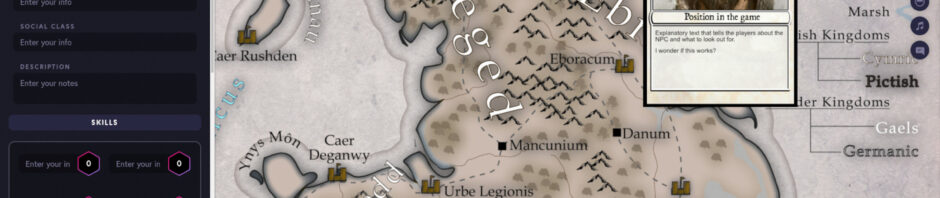
Here’s an early screenshot of the room:
 |
| The beginnings of a Role VTT Room |
It’s been interesting re-acquainting myself with Role after a lengthy (and continuing) sojourn over to Foundry VTT. Foundry has a powerful and flexible journal system that enables the presentation of many assets onto a canvas at the same time. The journal system also has folders, enabling a tidy way to manage lots of assets.
I think the best way of displaying several assets at the same time is to create them as graphical tokens and place them onto a map (which provides more control over size) or a displayed image. Above is an example of what I’m doing. The NPC is presented as a card (actually a token) on top of a shared image. I can then create many cards and display them as we are playing.
Another thing that I will need to get used to (again) is that in Foundry everyone has their own view of the canvas and the position of their webcams. In Role, it is very much a shared space with a common view, like a real table. So, anything placed as a token can be moved by anyone. It really is like people picking up paper assets at a table. It’s fine, just a different mode of being.
 |
| OBS Input Audio Filters |
My first streamed game was, largely, a success, and I think captured the fun of the session fairly well. It was a delight to have a number of the Dungeon Muser’s roster of players together with me for a game, including the Muser himself as a player. One enduring disappointment was my microphone volume, which is lower than the other participants, even though it doesn’t sound that way when actually playing live.
Some judicious YouTube surfing has found me a very good tutor for OBS settings. I am now running with a number of Input and Output filters, including ‘Gain’, which digitally boosts my volume. And yes, I really do think I have to turn myself up to 11, or at least by 11!
To afford me some more screen real estate, I am going to try and stream in 1440p 2k. This gives a better screen definition than trying to do the same thing by applying a zoom on the browser window itself. It does require me to have at least 6mb/s upload speed, and I can just about manage that (oh why can I not have full fibre!).
I run a fortnightly game on Foundry. To check my settings, I am going to stream the regular game but to a private channel, as I have a player that does not want to be streamed. This will afford me a chance to test the settings, and my mic volume in particular.
There is some enthusiasm for me to run some more D&D4e. I would stream that but using Foundry, as there is a very good system on there for that, including all the monsters. My OBS settings don’t need to change. Perhaps I can squeeze that into the streaming schedule too?